1. NGX-PFE Developer Tools
Additionally, the library contains the pfe-devtools which contain functionality to simplify the development of a page flow configuration/app.
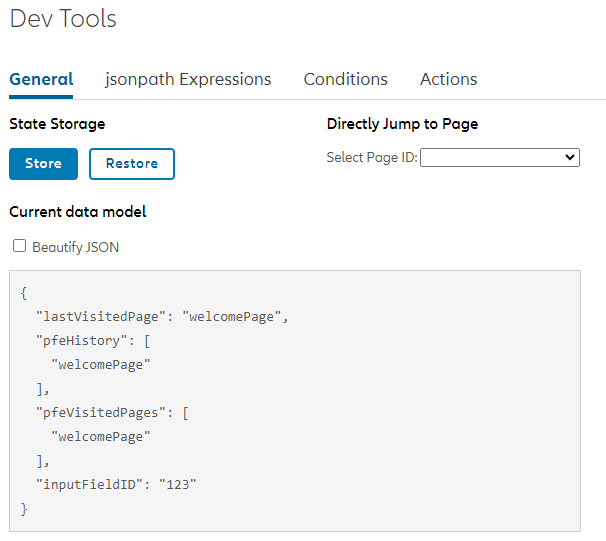
They can be integrated in the following way:
<pfe-devtools></pfe-devtools>The PfeDevToolsComponent needs to imported:
import { PfeDevToolsComponent } from '@allianz/ngx-pfe-devtools';By default, the development tools have to be activated with the devtools=true URL parameter.
It is also possible to always activate them:
<pfe-devtools [devToolsActive]="true"></pfe-devtools>It is recommended, to restrict them to the local/dev/staging environment. This could be done, in the following way:
<div *ngIf="(environment?.env === 'local') || (environment?.env === 'dev') || (environment?.env === 'staging')">
  <pfe-devtools></pfe-devtools>
</div>
It is also possible to exclude them from the production bundle via tailored builds.
1.1. Log State Hotkey
The current state can be logged with the following hotkey: ctrl+alt+l (Windows and Linux) or cmd+ctrl+l (MacOS)
1.2. Redux DevTools


The PFE supports the Redux DevTools for debugging the state of your application. Through them, you can inspect executed PFE Actions and state updates in real time.
To start using Redux DevTools, you will need to install the extension for your browser [Chrome | Edge | Firefox].
To navigate through the Redux Devtools state timeline, it is advised to pause the recording of state updates to ignore duplicates. This can be done by clicking the pause button in the top right corner of the Redux DevTools window.
The Redux dev tools state and timeline integration
The Redux dev tools PFE actions integration
Setup
The PfeReduxConnectorModule handles the bridge between PFE and Redux DevTools. To setup this feature in your application, make sure PfeReduxConnectorModule is imported (following the steps above) and enable it by providing the PFE_ENABLE_REDUX_DEVTOOLS injection token as follows:
import { PfeDevToolsComponent, PfeReduxConnectorModule, PFE_ENABLE_REDUX_DEVTOOLS } from '@allianz/ngx-pfe-devtools';

@NgModule({
  imports: [
    // ...
    PfeReduxConnectorModule,
    PfeDevToolsComponent
  ],
  providers: [
    // ...
    {
      provide: PFE_ENABLE_REDUX_DEVTOOLS,
      useValue: environment?.env === 'local' || environment?.env === 'dev' || environment?.env === 'staging'
    }
  ]
})
It is strongly recommended to not enable them in production environments.
2. NGX DevTools Plugin Integration
The PFE developer tools can also be integrated as a plugin into @allianz/ngx-devtools. This provides a unified developer tools experience across Allianz libraries, with the PFE-specific views and commands accessible directly from the ngx-devtools overlay.
2.1. Setup
Install the @allianz/ngx-devtools package as a dependency:
npm install @allianz/ngx-devtoolsThen register the PFE plugin using provideDevTools together with withPfePlugin:
import { provideDevTools } from '@allianz/ngx-devtools';
import { withPfePlugin } from '@allianz/ngx-pfe-devtools';

@NgModule({
  // ...
  providers: [
    // ...
    provideDevTools({}, withPfePlugin()),
  ],
})
export class AppModule {}
2.2. Available Views
The PFE plugin registers the following views inside the ngx-devtools panel:
| View | Description |
|---|---|
| General | Store/restore state, jump to a page, inspect the current state. |
| JSONPath Expressions | Evaluate JSONPath expressions and PFE conditions against the state. |
| Actions | Inspect and run PFE actions. |
| Navigation Graph | Interactive visualization of the navigation configuration. |
| Trace | Record a timeline of state changes, actions, and navigation events. |
2.3. Available Commands
The plugin also exposes commands that can be invoked from the ngx-devtools command palette:
| Command | Description |
|---|---|
| Navigate Next | Navigate to the next page. |
| Navigate Back | Navigate to the previous page. |
| Navigate To | Navigate to a specific page (Default shortcut: Ctrl+Alt+N). |
| Navigate To Error Page | Navigate to the configured error page. |
| Print State To Console | Log the full PFE state to the console. |
| Copy State To Clipboard | Copy the full PFE state as JSON to the clipboard. |
| Restore State From Clipboard | Restore PFE state from JSON in the clipboard. |
| Store State | Persist the current state in backend or session storage. |
| Restore State | Restore the previously persisted state from backend or session storage. |